Category: Minor update

  • Release notes – v3.13.0

    3.13.0

    Animated gradient background, support for running extensions in the background and Infotaulu Queue Number extension.

    Presentation view and editors

    • The gradient background can be shown animated with the press of a button. The animation fades through the different shades of the selected gradient at the desired speed.
    • Added keyboard shortcuts for undo/redo functions in the slide editor.
    • Optimization of the color palette generation function. Generating a color palette from any image is now much faster than before.
    • YouTube background works again in all editors.
    • Improved the functionality of the editors.

    Content Editor

    • Improved handling of multiple animations in the timeline. Selected animations can now be moved from any point.
    • The Content Editor now supports WordPress’ latest block editor, which is used if all available blocks support it.

    Infotaulu settings

    • Updated the contents of the instructions.
    • Fixed an issue with the background color of the logo settings buttons.

    Extensions

    • Added the ability to run extensions in the background instead of the content editor’s block. This can be used in extensions that are intended to be on every slide.
    • The Infotaulu Queue Number extension, which utilizes the new feature, has been added as a new included extension.
    • Through the Infotaulu API, extensions can now check whether the extension is running in the presentation view, which allows the extension to perform different types of actions, for example in the content editor.
    • Added the ability to choose whether to display a snowfall or a rain effect to the Infotaulu Snow fall effect extension.
    • Extensions can now be backed up using the Infotaulu Backup tool.

    Infotaulu Queue Number extension

    • Shows the queue number during a slideshow and plays a sound effect.
    • The size of the numbers, the first number, the style and the use of the sound effect can all be configured directly in the “Extensions” tab of the Infotaulu settings.
    • The extension can be controlled by external events, which allows the use and construction of different interfaces for the extension.
    • Events can be used to change the queue number, show the current number or reset the number back to the first number specified in the setting.

    Other changes

    • Improved the selection of the color setting for extensions in JsonEditor (the graphical editor for extensions in the content editor).
    • Changed all extensions to use Json-format settings.
    • Improvements to the internal structure of the Infotaulu.
    • Fixed an issue with the Cover block that caused the block to not display at full size.
    • Updated all 3rd party libraries.

    Package version changes

    @infotaulu/backup@1.1.0+build3

    @infotaulu/backup@1.2.0+build1

    @infotaulu/blocks@3.1.0+build3

    @infotaulu/blocks@3.2.0+build13

    @infotaulu/components@1.1.0

    @infotaulu/components@1.2.0+build1

    @infotaulu/extensions@2.0.0+build9

    @infotaulu/extensions@2.0.0+build11

    infotaulu-channeleditor@1.3.1+build5

    infotaulu-channeleditor@1.4.0+build38

    infotaulu-content-editor@3.5.0+build37

    infotaulu-content-editor@3.6.0+build388

    infotaulu-frontend@1.5.0+build101

    infotaulu-frontend@1.6.0+build11

    infotaulu-settings@1.3.0-build+39

    infotaulu-settings@1.3.0-build+127

    infotaulu-slide-editor@3.4.0+build-406

    infotaulu-slide-editor@3.5.0+build105
  • Release notes – v3.12.0

    3.12.0

    Wizard for the Slide Editor

    Slide editor

    • Slide wizard lets you quickly create a new slides.

    Quality Improvements

    • Updated all 3rd party dependencies.
    • Optimized package sizes and load times.
  • Release notes – v3.11.0

    3.11.0

    User interface gesture control, new extension, and fixes.

    User Interface Gesture Control

    • User Interface Gesture Control is an experimental feature. Move to the next or previous slide in a slideshow by raising your hand and swiping left or right. This feature uses the webcam and is disabled by default. It can be enabled in the Infotaulu settings.

    Infotaulu Extensions

    • New extension: Infotaulu Timer. Show a timer that counts down to or from a specific date and time. Like other extensions that display text, this can be displayed in any font, color, or size.
    • New UI controls for “time”, “date”, and “date and time” in the extension settings.
    • For extension development: New extension properties timeUnit and updateInterval that can be used in extension code to disable their associated UI controls.

    Content Editor

    • Fixed an issue with the quick preview in the content editor where the preview sometimes did not update after saving the content.
    • Fixed an issue where sample content did not work in the content editor.
    • Fixed issues with the default animation duration and delay in the animation panel when previewing an animation. Fixed missing animation names from keyframes in the animation panel when using a non-basic animation version.
    • Fixed an issue where the Infotaulu API was not loading the current settings in the content editor.
    • Improvements to the block styles in the Infotaulu extension.

    Settings

    • Fixed a permissions issue in the sample content generator that prevented some users from executing the feature.
    • Disabled the backup button if the user does not have the necessary permissions to execute it.
  • Release notes – v3.10.0

    3.10.0

    Focal point control for background image, video, and pdf file, optimizations, quality improvements, and bug fixes.

    New Features and Improvements

    Content editor and Slide editor

    The new focal point control allows you to control the position of the pdf, background image or background video on the slide.

    Optimizations

    • All libraries were optimized and dependencies updated to the latest versions.
    • All editors takes now 30-50% less space and also loads faster.

    Quality Improvements

    • Optimized loading of all libraries.
    • Fixed a number of bugs and performance issues.
    • IMPORTANT! Remember to change the category from Post > Categories because this makes the post visible in Updates page.
  • Release notes – v3.9.0

    3.9.0

    Change ownership action

    • Users can now change the owner of any display, channel, slide, or content.

    Bug fixes

    • Fixed an issue with the license manager not retrieving the license details.

    Other

    • Improvements for error logging.
    • Added license-related filters for the Infotaulu sandbox.
    • Updated all third-party libraries.
  • Release notes – v3.8.0

    3.8.0

    Infotaulu Backup Tool

    • An easy way to back up and restore all displays, channels, slides, contents, color palettes, users in Infotaulu user groups, and Infotaulu settings.
    • Backups can be stored on the server or downloaded.
    • All displays, channels, slides, contents, and color palettes can be restored to original users or assigned to any existing user.
    • Because backups may contain users and their permission sets, backups are always signed to prevent any tampering.
    • To add an extra layer of security, backups can also be encrypted with 256-bit AES using a password.

    License Manager App

    • The license manager has been completely rewritten and is integrated as part of the settings app.

    Frontend, Content Editor, and Slide Editor

    • The specific theme requirement for Infotaulu has been removed. Infotaulu now works with any theme as it has its own styles. In the future, Infotaulu will also provide a way to use and design custom themes.

    Extensions

    • All built-in extensions are now signed, and signatures are validated during installation.

    Settings App

    • The Tools tab now provides a way to add the Infotaulu admin role for administrators.
    • A new “Keys” tab allows generating, importing, and exporting Infotaulu private and public keys. These keys are used for signing and encryption.
    • The Extensions list table default size has been changed to 10.
    • Fixed an issue with the business hour controls using the 12-hour time format.
    • Fixed visibility issues with notices.

    Bug Fixes

    • Fixed an issue in the channel CPT list where the “Number of slides” column showed a warning if one or more slides were deleted.
    • Fixed an issue that in some cases caused an error during plugin activation.
    • Fixed an issue that caused the display editor to crash randomly.
    • Fixed an issue that caused a warning `Doing it Wrong: WP_Font_Face::validate_font_face_declarations` if debugging was turned on.
    • Fixed an issue that caused a crash during translation loading in WP 6.8.
    • Added missing `EDIT_OTHERS_CONTENTS` capability for Infotaulu admins.
    • Fixed an issue with saving default settings after installation.
  • Release notes – v3.7.0

    Release notes – v3.7.0

    3.7.0

    New animation controls in the content editor, quality improvements, and bug fixes.

    New Features and Improvements

    Content editor

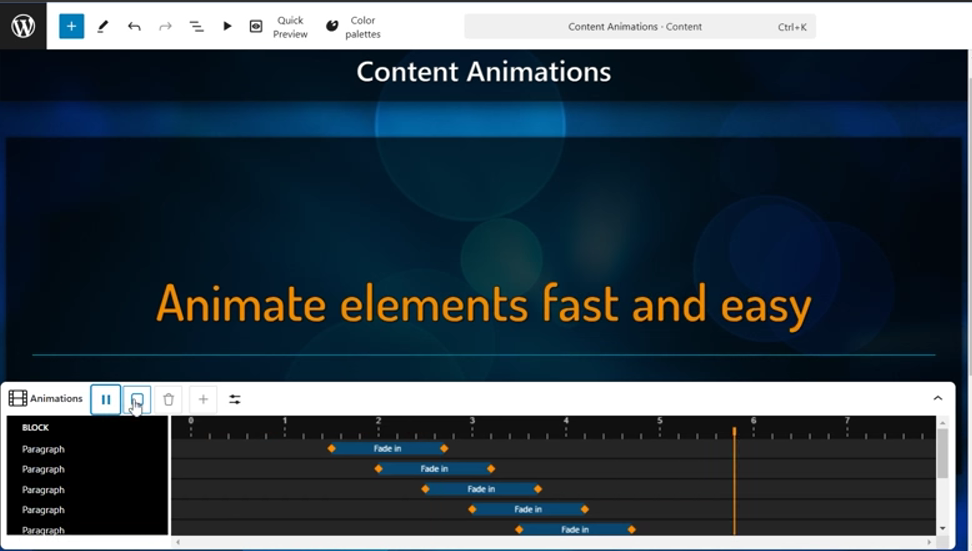
    • Added a new animation control in the content editor, which makes it easier to animate the content.
    • Click “Animate all elements” to quickly add animations to all elements and adjust each animation individually with easy-to-use visual controls.
    • Animations can be dragged, resized and much more.
    • New animation control shows all animations in timeline view and allows you to adjust them individually or in bulk.
    • Slide loading in the content editor is now much faster.

    Content editor and Slide editor

    • Gradient support has been added to color palettes.
    • The color palette generator lets you easily create new gradients in a color palette from any image. You can also create a completely new gradient yourself.
    • The background color of the slides can now also be selected from the color palette.
    • Support for gradient palettes has been added to the “Rays” background type.
    • This update also automatically adds gradients to the Infotaulu built-in default color palette.

    Settings

    • The extension management page in Infotaulu settings has been improved with better and more isolated validation and upload processes for extensions. Previously, uploading the same extension multiple times could sometimes result in issues where the older version remained active alongside the new version. Now, uploaded extensions are isolated, ensuring they cannot affect each other or the rest of the system.

    Extensions

    • Infotaulu frontend extensions now support multiple instances, allowing the same extension to be used multiple times on a single slide with different settings. This enhancement enables users to display, for example, weather information in two different units on the same slide, which was not possible before due to a limitation of only one configuration per slide.
    • Extensions can now define a schema for supported and required settings, significantly simplifying configuration for users. With this schema in place, a graphical user interface is automatically generated for each setting, guiding users through the configuration process. For developers, this means reduced coding effort, as there is no longer a need to manually check for valid configuration values; the settings view enforces this, preventing the saving of disallowed settings.
    • The Infotaulu content editor now features event simulation tools for extensions. If an extension utilizes slide change or channel change events, these can now be easily triggered directly from the extension’s sidebar, enhancing the testing and configuration process for users.

    Updated Extensions

    Following extensions have been updated and can now be individually configured in the content editor:

    • Infotaulu Weather
    • Infotaulu DateTime

    Other

    • Updated all third-party libraries.
    • Fixed translation issues in WP 6.7 and later.

    Bug fixes

    • Fixed slide autosave functionality in the content editor.
    • Fixed the Quick preview feature in the content editor.
  • Release notes – v3.6.0

    Release notes – v3.6.0

    WordPress version 6.6 support, completely rebuild display editor, better animation controls and bug fixes.

    New features

    Display editor

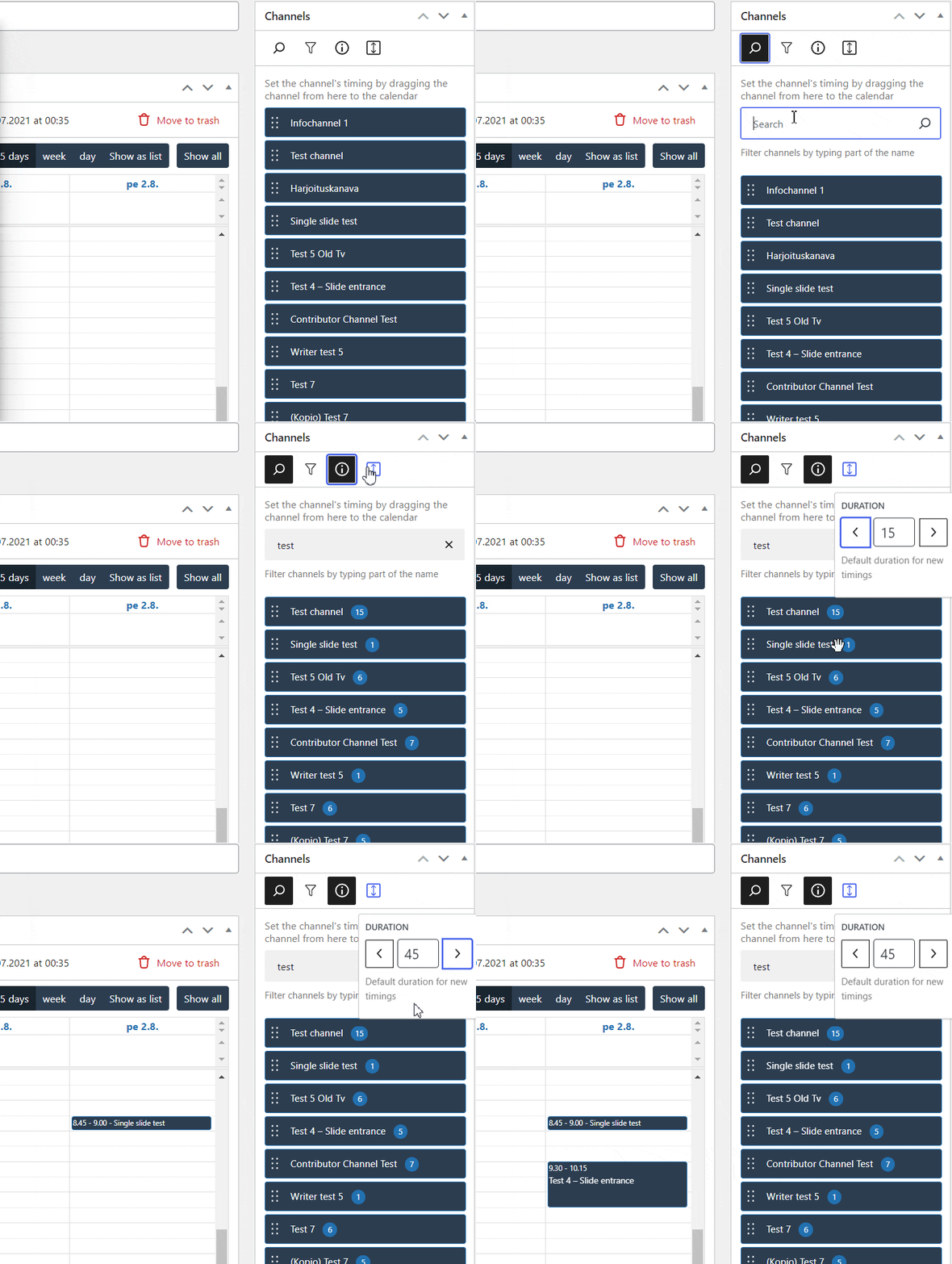
    • Timings can be copied from the channel timing list view.
    • The channel list can now be filtered, which makes scheduling channels easier and faster.
    • The channel list now also shows the number of slides in each channel at the press of a button.
    • You can set a default duration for new timings, which is automatically set for each channel. You can easily change the default duration at any time.
    • The display editor automatically warns if one of the scheduled channels has been deleted or there are other errors in the timings.
    • Faulty timings can also be deleted easily, or you can check them before deletion.

    Content editor


    • New animation selection.
    • See the animation immediately when hovered.
    • Find an animation by using a easy search.
    • Animate everything with just a one click. “Animate all elements” adds simple fade in animation to all elements and offsets delays for each element automatically.

    Improvements

    • Hotkeys for save (Ctrl+S), undo (Ctrl+Z) and redo (CTRL+Y) now work in all editors.
    • The start and end time of the video background can be adjusted even more precisely, even to the millisecond.
    • You can also select a specific time interval from the video background, which is repeated in a loop while the slide is visible.

    Bug fixes

    Channel editor

    • Fixed an issue in top menu bar which caused the schedule menu option to constantly re-render.
    • Fixed an issue with deleting the channel when one or more slides had pdf loading error (removed pdf for example).
    • Fixed an issue that prevented removing a slide from the channel if the slide couldn’t be loaded.

    Settings

    • Fixed an issue that caused a crash when the user tried to deactivate Infotaulu in Plugins page when certain plugins were active.
    • Fixed issues with Infotaulu roles and capabilities setup in installation phase.
    • Fixed character encoding in sample content generator.
    • Fixed an issue with Infotaulu options where user roles were not removed during uninstallation

    Content editor

    • Slide settings sidebar switches now to Block edit sidebar automatically when any block is selected. Slide settings sidebar can also be opened just by clicking the background.
    • Fixed Content editor crashing on wp 6.5
    • Fixed Content editor background image changing on wp 6.5
    • Fixed missing overlay on Rays background type on wp 6.5
    • Fixes an issue with default palette not be set after initialization

    Others

    • Add filters for the first time notice and generator
    • Improve range select controls (Rays background color range for example)
  • Release notes – v3.5.0

    Release notes – v3.5.0

    New background type, extension, recoded editors

    New features

    • New background type: “Rays”. This background type looks like the northern lights, but with selected colors.
    • New expansion: “Snow Fall Effect”. This extension can be set to appear on all slides in the channel or on a single slide.

    Improvements

    • Fully recoded content editor, extension block, frontend, and settings.
    • Optimization of memory and data packages. Everything loads faster and takes up less memory than before, resulting in a smoother user experience.
    • Color palettes load 50% faster than before.
    • On the frontend side, all slides also load 50% faster and running the user interface consumes less bandwidth for startup and channel updates.
    • Optimized slide editor, this reduces the file size of the slide editor.
    • Better extension settings. All JSON settings are now automatically displayed as components in the content editor.
    • Improved channel update process. Instead of loading slides during an update check, the channel update check now uses hash values. This significantly reduces the bandwidth required for channel updates.

    Bug fixes

    • Fixed problems in context help menus of Infotaulu settings.
    • Fixed a problem in the Infotaulu settings in the settings for the number of rows in the table.
    • Fixed an issue related to missing styles from some slides when opened in the slide editor.
    • Fixed an issue where the slide preview was not loading in the content editor.
    • Fixed an issue where the extension configuration was not reset when the extension constructor was changed in the content editor.
    • Fixed visibility problems in the Content editor’s Info panel menu.
    • Fixed font loading issues.
    • Fixed a screen reset function in Infotaulu settings.
    • Fixed an issue with removing the site license during the Infotaulu uninstallation process.
  • Release notes – v3.4.0

    Release notes – v3.4.0

    3.4.0

    New channel editor and improved content editor and WP 6.4+ support.

    This update brings a new channel editor and fixes issues with the content editor.

    Completely redesigned channel editor

    • The channel editor is optimized so that organizing and editing channels can be done quickly and smoothly.
    • The editor used to slow down significantly when adding multiple slides to a channel.
    • Adding new slides was slow and organizing slides was difficult.
    • The new optimized channel editor uses memory management efficiently and editing channels is always as smooth, regardless of the number of slides or the size of their backgrounds.
    • All changes made to the channel can be canceled or redone using the “Undo” and “Redo” functions.

    Faster editing

    • No more searching for the same slides in the list again and again, because it is now possible to easily duplicate the slides on the channel.
    • Edit slides and content fast from the same menu.

    Adding slides to the channel

    • Adding new slides is also easier thanks to the new menu with a search function.
    • Select the desired slide from the list or filter slides by typing a part of the slide name.

    Other improvements

    • Problems related to the appearance of the slides have been fixed and all slides look the same even in the presentation view.
    • All changes made are also backed up, just like content and slides. For example, in the event of a connection or power failure, no data is lost. The channel editor will ask if you want to restore the backup the next time you edit the channel.

    Content Editor Improvements

    • The entire content editor has been redone using the latest technology.
    • All different background types load faster and more stable.

    Bug fixes

    • Fixed issues with slide editor hints.
    • Fixed problems related to color palettes (Slide editor and Content editor).
    • Fixed missing style definitions.

    G

viluCloud