Category: Updates

  • Release notes – v3.7.0

    Release notes – v3.7.0

    3.7.0

    New animation controls in the content editor, quality improvements, and bug fixes.

    New Features and Improvements

    Content editor

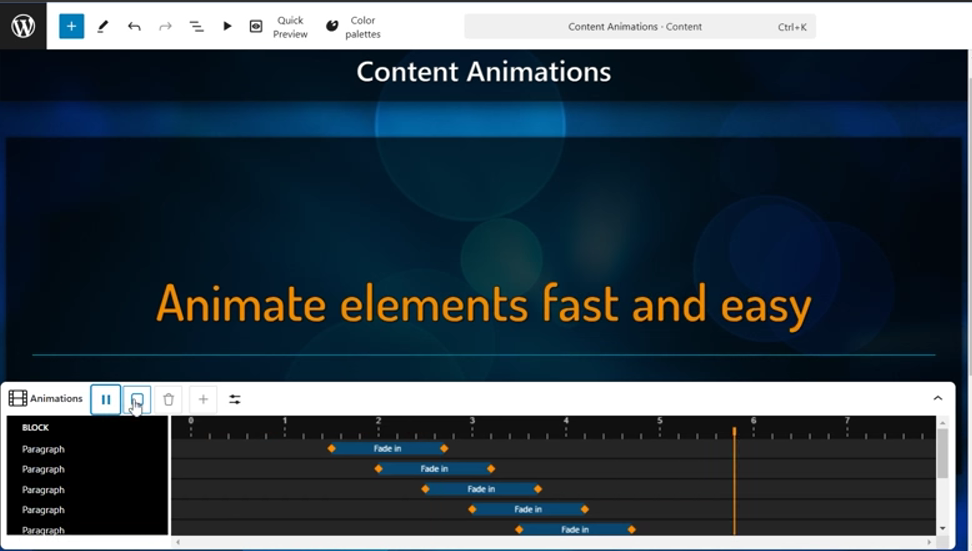
    • Added a new animation control in the content editor, which makes it easier to animate the content.
    • Click “Animate all elements” to quickly add animations to all elements and adjust each animation individually with easy-to-use visual controls.
    • Animations can be dragged, resized and much more.
    • New animation control shows all animations in timeline view and allows you to adjust them individually or in bulk.
    • Slide loading in the content editor is now much faster.

    Content editor and Slide editor

    • Gradient support has been added to color palettes.
    • The color palette generator lets you easily create new gradients in a color palette from any image. You can also create a completely new gradient yourself.
    • The background color of the slides can now also be selected from the color palette.
    • Support for gradient palettes has been added to the “Rays” background type.
    • This update also automatically adds gradients to the Infotaulu built-in default color palette.

    Settings

    • The extension management page in Infotaulu settings has been improved with better and more isolated validation and upload processes for extensions. Previously, uploading the same extension multiple times could sometimes result in issues where the older version remained active alongside the new version. Now, uploaded extensions are isolated, ensuring they cannot affect each other or the rest of the system.

    Extensions

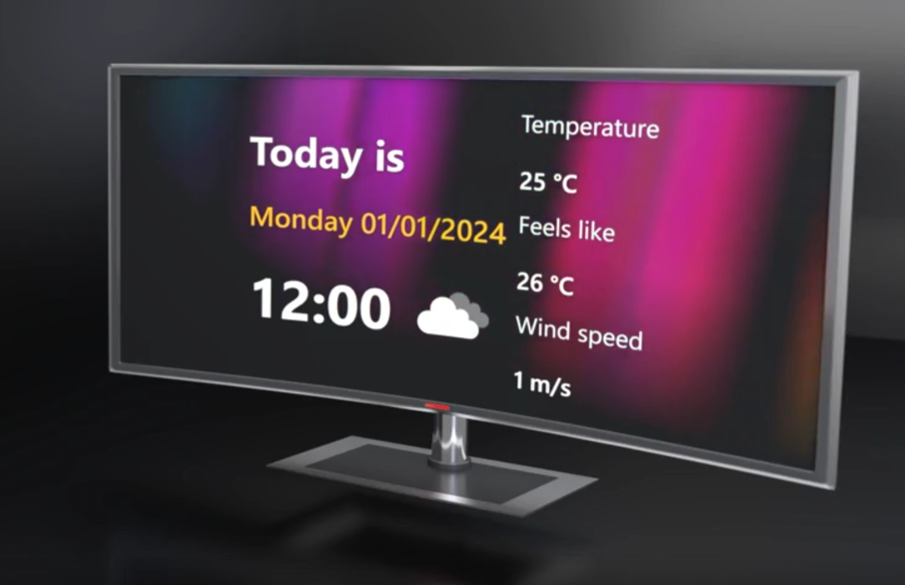
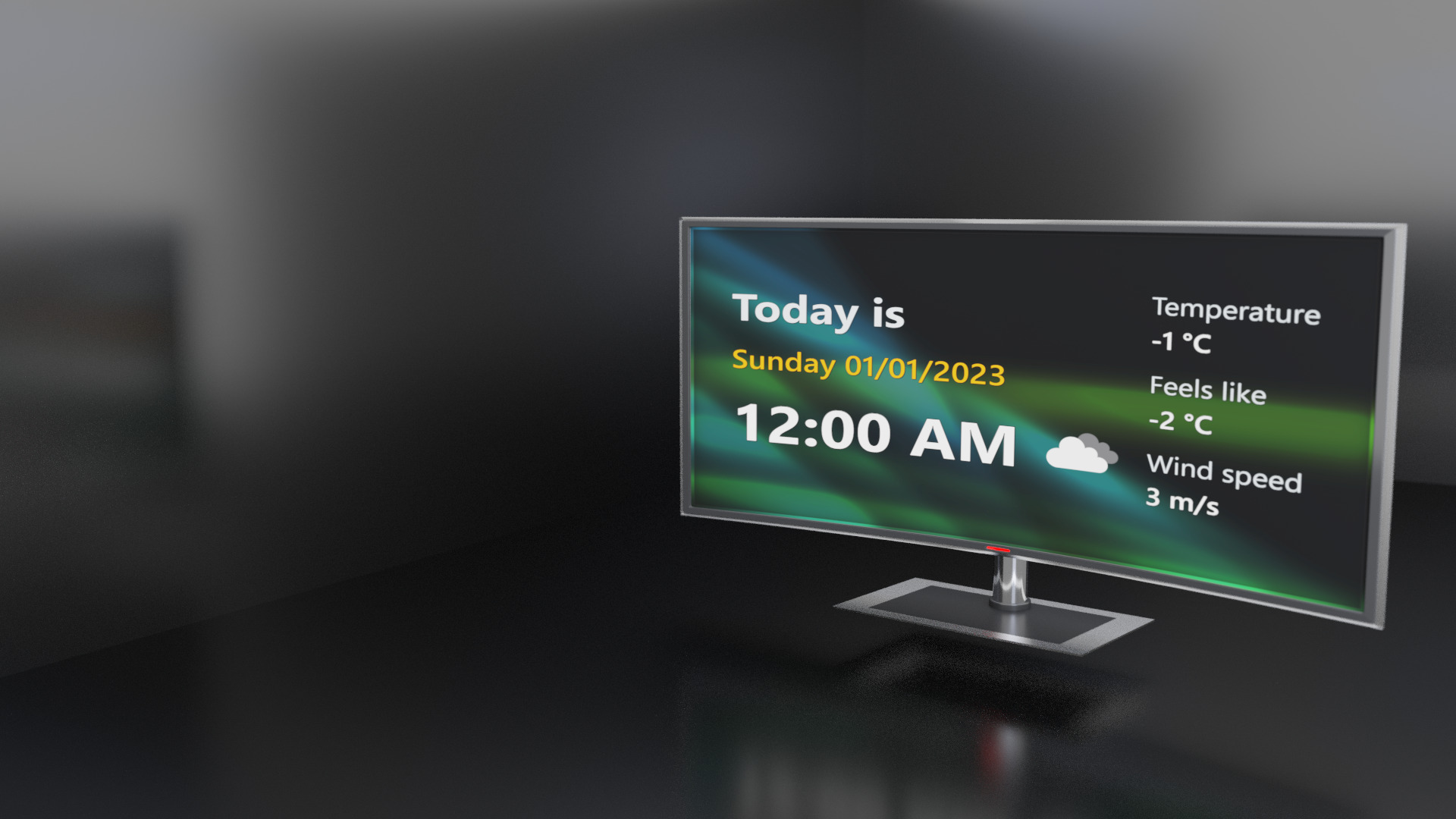
    • Infotaulu frontend extensions now support multiple instances, allowing the same extension to be used multiple times on a single slide with different settings. This enhancement enables users to display, for example, weather information in two different units on the same slide, which was not possible before due to a limitation of only one configuration per slide.
    • Extensions can now define a schema for supported and required settings, significantly simplifying configuration for users. With this schema in place, a graphical user interface is automatically generated for each setting, guiding users through the configuration process. For developers, this means reduced coding effort, as there is no longer a need to manually check for valid configuration values; the settings view enforces this, preventing the saving of disallowed settings.
    • The Infotaulu content editor now features event simulation tools for extensions. If an extension utilizes slide change or channel change events, these can now be easily triggered directly from the extension’s sidebar, enhancing the testing and configuration process for users.

    Updated Extensions

    Following extensions have been updated and can now be individually configured in the content editor:

    • Infotaulu Weather
    • Infotaulu DateTime

    Other

    • Updated all third-party libraries.
    • Fixed translation issues in WP 6.7 and later.

    Bug fixes

    • Fixed slide autosave functionality in the content editor.
    • Fixed the Quick preview feature in the content editor.

  • Patch notes – v3.6.4

    3.6.4

    Added support for the WordPress version 6.7 and later.

    That’s it, nothing more this time.

  • Patch notes – v3.6.3

    Patch notes – v3.6.3

    3.6.3

    Patch update for missing fonts and support for the Infotaulu Weather service provider

    Other

    • Added support for the Infotaulu Weather service provider. The weather service provider used in the presentation view can be selected by the administrator in the Infotaulu settings.
    • Updated all third-party libraries.

    Bug fixes

    • Fixed an issue where fonts were not displaying properly in WordPress version 6.5 or later.
  • Patch notes – v3.6.2

    Patch notes – v3.6.2

    3.6.2

    Presentation view slide change animation improvement, Weather API and fixes.

    New Features and Improvements

    • Slides now change more smoothly in the presentation view, regardless of the type of slide or the elements used in it.
    • It is now possible to set a lock code for the screens, which is required when opening the screen. The length of the lock code can also be determined in the settings.
    • The visibility of the presentation view clock can now be set in the settings.
    • Slides in the presentation view can now be changed with the arrow keys.
    • Restored article conversion tool, which can be used to convert an article into Infotaulu content.

    New Weather interface

    • Weather fetching is now done entirely on the server side, which prevents users from seeing the API key or settings on the presentation view side.
    • In the Infotaulu settings, you can also specify how often information is retrieved from the weather service provider’s interface.
    • The retrieved information is stored in the Infotaulu’s cache, from where it is returned depending on the set time limit.
    • Previously, each screen fetched weather information separately, which caused the API key of the weather service provider to be used several times. Almost all weather service providers charge for queries that go over a certain limit. With the Infotaulu Weather API, you can determine exactly how often queries are made to the weather service provider.

    Bug fixes

    • Fixed a bug in the screen editor where the “Edit channel” button didn’t work for all channels.
    • Fixed a bug in the notification bar of the presentation view, which caused the notification to not always close correctly.
  • Release notes – v3.6.0

    Release notes – v3.6.0

    WordPress version 6.6 support, completely rebuild display editor, better animation controls and bug fixes.

    New features

    Display editor

    • Timings can be copied from the channel timing list view.
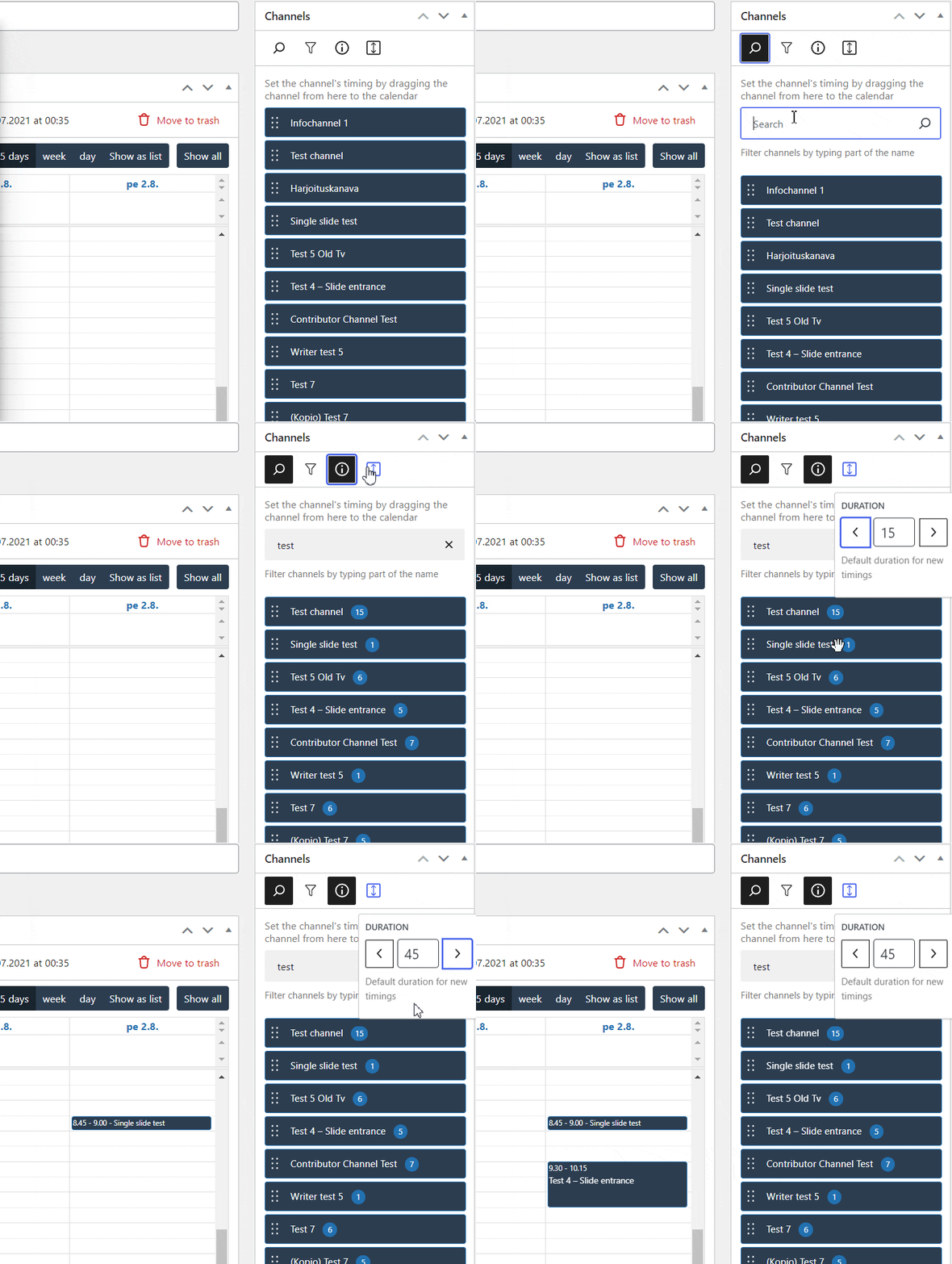
    • The channel list can now be filtered, which makes scheduling channels easier and faster.
    • The channel list now also shows the number of slides in each channel at the press of a button.
    • You can set a default duration for new timings, which is automatically set for each channel. You can easily change the default duration at any time.
    • The display editor automatically warns if one of the scheduled channels has been deleted or there are other errors in the timings.
    • Faulty timings can also be deleted easily, or you can check them before deletion.

    Content editor


    • New animation selection.
    • See the animation immediately when hovered.
    • Find an animation by using a easy search.
    • Animate everything with just a one click. “Animate all elements” adds simple fade in animation to all elements and offsets delays for each element automatically.

    Improvements

    • Hotkeys for save (Ctrl+S), undo (Ctrl+Z) and redo (CTRL+Y) now work in all editors.
    • The start and end time of the video background can be adjusted even more precisely, even to the millisecond.
    • You can also select a specific time interval from the video background, which is repeated in a loop while the slide is visible.

    Bug fixes

    Channel editor

    • Fixed an issue in top menu bar which caused the schedule menu option to constantly re-render.
    • Fixed an issue with deleting the channel when one or more slides had pdf loading error (removed pdf for example).
    • Fixed an issue that prevented removing a slide from the channel if the slide couldn’t be loaded.

    Settings

    • Fixed an issue that caused a crash when the user tried to deactivate Infotaulu in Plugins page when certain plugins were active.
    • Fixed issues with Infotaulu roles and capabilities setup in installation phase.
    • Fixed character encoding in sample content generator.
    • Fixed an issue with Infotaulu options where user roles were not removed during uninstallation

    Content editor

    • Slide settings sidebar switches now to Block edit sidebar automatically when any block is selected. Slide settings sidebar can also be opened just by clicking the background.
    • Fixed Content editor crashing on wp 6.5
    • Fixed Content editor background image changing on wp 6.5
    • Fixed missing overlay on Rays background type on wp 6.5
    • Fixes an issue with default palette not be set after initialization

    Others

    • Add filters for the first time notice and generator
    • Improve range select controls (Rays background color range for example)
  • Release notes – v3.5.0

    Release notes – v3.5.0

    New background type, extension, recoded editors

    New features

    • New background type: “Rays”. This background type looks like the northern lights, but with selected colors.
    • New expansion: “Snow Fall Effect”. This extension can be set to appear on all slides in the channel or on a single slide.

    Improvements

    • Fully recoded content editor, extension block, frontend, and settings.
    • Optimization of memory and data packages. Everything loads faster and takes up less memory than before, resulting in a smoother user experience.
    • Color palettes load 50% faster than before.
    • On the frontend side, all slides also load 50% faster and running the user interface consumes less bandwidth for startup and channel updates.
    • Optimized slide editor, this reduces the file size of the slide editor.
    • Better extension settings. All JSON settings are now automatically displayed as components in the content editor.
    • Improved channel update process. Instead of loading slides during an update check, the channel update check now uses hash values. This significantly reduces the bandwidth required for channel updates.

    Bug fixes

    • Fixed problems in context help menus of Infotaulu settings.
    • Fixed a problem in the Infotaulu settings in the settings for the number of rows in the table.
    • Fixed an issue related to missing styles from some slides when opened in the slide editor.
    • Fixed an issue where the slide preview was not loading in the content editor.
    • Fixed an issue where the extension configuration was not reset when the extension constructor was changed in the content editor.
    • Fixed visibility problems in the Content editor’s Info panel menu.
    • Fixed font loading issues.
    • Fixed a screen reset function in Infotaulu settings.
    • Fixed an issue with removing the site license during the Infotaulu uninstallation process.
  • Release notes – v3.4.0

    Release notes – v3.4.0

    3.4.0

    New channel editor and improved content editor and WP 6.4+ support.

    This update brings a new channel editor and fixes issues with the content editor.

    Completely redesigned channel editor

    • The channel editor is optimized so that organizing and editing channels can be done quickly and smoothly.
    • The editor used to slow down significantly when adding multiple slides to a channel.
    • Adding new slides was slow and organizing slides was difficult.
    • The new optimized channel editor uses memory management efficiently and editing channels is always as smooth, regardless of the number of slides or the size of their backgrounds.
    • All changes made to the channel can be canceled or redone using the “Undo” and “Redo” functions.

    Faster editing

    • No more searching for the same slides in the list again and again, because it is now possible to easily duplicate the slides on the channel.
    • Edit slides and content fast from the same menu.

    Adding slides to the channel

    • Adding new slides is also easier thanks to the new menu with a search function.
    • Select the desired slide from the list or filter slides by typing a part of the slide name.

    Other improvements

    • Problems related to the appearance of the slides have been fixed and all slides look the same even in the presentation view.
    • All changes made are also backed up, just like content and slides. For example, in the event of a connection or power failure, no data is lost. The channel editor will ask if you want to restore the backup the next time you edit the channel.

    Content Editor Improvements

    • The entire content editor has been redone using the latest technology.
    • All different background types load faster and more stable.

    Bug fixes

    • Fixed issues with slide editor hints.
    • Fixed problems related to color palettes (Slide editor and Content editor).
    • Fixed missing style definitions.

    G

  • Patch notes – v3.2.1

    3.2.1

    Adds a support for the WordPress version 6.2+ and optimizations.

    Admin side

    • Optimized loading of all Infotaulu admin pages.
    • The Dashboard widget now shows a notification when a new update is available.

    Other

    • Added support for 4K UHD background (experimental).

    Bug fixes

    • Fixed a problem where the maintenance page was not removed when deactivating.
  • Release notes – v3.2.0

    3.2.0

    New animation system for content, slide reading duration evaluation, better fonts.
    This update brings new features, improvements and fixes.

    Content editor and frontend

    • Implemented a new animation system for content blocks that supports concurrent animations and allows for the customization of animation duration for each block.
    • Added frontend fonts to ensure consistent visual appearance of content across all devices.

    Quick Preview

    • Implemented a new ‘quick preview’ button in the content editor. This button opens a resizable window that displays the actual preview of the current content and slide. In testing, content creation was significantly faster since users no longer need to switch between browser tabs to see the preview. The quick preview is optimized for Infotaulu content, resulting in faster preview updates compared to the native WordPress preview function.

    Block patterns

    • Infotaulu now fully supports the WordPress pattern library and patterns, including a wider selection of built-in patterns.

    Slide editor

    • Added read time estimation to the slide editor. The editor now calculates the estimated read time based on the current content and suggests a longer duration for the slide if the current duration is insufficient for reading the content. The estimation is based on the average reading speed for various languages found at https://irisreading.com/average-reading-speed-in-various-languages. This feature’s locale can be changed in Infotaulu settings.

    Improvements

    • Enhanced logging details to include the IP address for failed login attempts.
    • Optimized the temperature rendering for the weather extension. Values are now rounded to the nearest integer, and zero temperature is consistently displayed as 0 (rather than -0 or 0).
    • Enhanced the frontend fonts to ensure consistent visual appearance across all devices. Previously, fonts were rendered differently depending on the device, leading to missing fonts on certain devices. Infotaulu now includes built-in fonts that will be loaded and used, resulting in consistent font rendering regardless of the device.
    • Added a new option in extension development that enables JSON to be pretty printed in extension help guides.
    • Streamlined the Infotaulu dashboard widget by removing trashed displays.
    • Improved the dashboard widget by removing the search engine link for users who do not have the required capabilities to edit the link.
    • Optimized the channel scheduler clipboard styles by ensuring that all copied entries are the same width, resulting in a more visually clear and consistent clipboard.
    • Disabled the “edit channel” menu item in the channel scheduler for users who do not have the required capabilities to actually edit the channel.
    • Changed the required capability for issue reporting from “edit_posts” to “report_issues” to give administrators more control over who can send issue reports.
    • Improved slide editor top toolbar and menu styles by adjusting alignments, and changing the position of undo/redo buttons to prevent them from jumping to the right during autosave.
    • Changed the scroll speed of frontend notification messages to use the rendered font family in speed calculations. This results in a more consistent and smoother scrolling experience across different devices and browsers.
    • Improvement that separates the Infotaulu frontend from WordPress themes. This means that the Infotaulu frontend will have its own theme support, which will not affect other areas in the current WordPress installation or vice versa. However, there are still some known issues if the WordPress theme is changed to something else than the one shipped with the Infotaulu. This improvement makes the Infotaulu more modular and less dependent on the WordPress theme.
    • Users can now choose which font to use in the content editor and on the frontend, giving them more control over the look and feel of their content.
    • Upgraded the content editor loading process to enhance the speed and performance.

    Bug fixes

    • Fixed an issue related to user roles where content editing and slide editor did not work for some users or some functions were not available. All user roles and associated permissions have been checked and are now working correctly. More information can be found at https://www.vilucloud.com/user-roles-and-permissions/
    • Resolved a problem with bus schedules not showing up any more, Updated Infotaulu Bus Schedules API url.
    • Resolved a problem where the height of the color palette edit view was incorrect.
    • Resolved the problem of excessive debug log entries caused by the timeout error of the update service.
    • Resolved an issue with the Infotaulu issue report API.
    • Resolved a bug that caused the content editor to crash when animations failed to load.
    • Resolved a frontend issue that caused crashes in certain cases when an extension block was present without configuration.
    • Resolved an issue that prevented some Infotaulu users from loading content with extensions
    • Removed edit links from channel editor for unauthorized users who lack the necessary permissions to edit slides or contents.
    • Resolved an error in the channel scheduler that occurred when an empty schedule was encountered in certain situations.
    • Resolved a bug that caused channel schedule calendar items to not be properly selected in some cases.
    • Resolved a display problem with notices on certain admin pages.
    • Resolved a rendering issue with the datetime-picker component.
    • Corrected redirection issues after login, such as redirecting users with only a single role to their profile page instead of the dashboard, and ensuring users are redirected to the What’s New page only once after Infotaulu update.
    • Resolved an issue in the slide editor where certain users were unable to view the publish/save button.
    • Resolved an issue in certain admin pages where tables failed to update properly or the sorting function did not work as intended.
    • Improved user capability and permission checks to ensure more accurate and consistent results throughout the application.
    • Resolved access denied errors for users with appropriate permissions.
    • Resolved a formatting error in Infotaulu logs that occurred when multiple items were copied.
    • Resolved an issue in the slide editor where modifying the duration of a slide resulted in the resetting of background settings for some users.
    • Resolved an issue with the rendering of the first-time user tooltip in the slide editor.
    • Resolved an issue where content preview was not loading for some users.
    • Resolved an issue where creating a new slide in the content editor caused a page reload, impacting the user experience. This has been fixed.
    • Resolved an issue with block pattern sizes not displaying correctly in the block library.
    • Resolved an issue with the rendering of the Image block in the content editor.
    • Resolved a bug in the content editor top bar color palette selection, where the presence of an empty color palette could cause the content editor to crash in certain scenarios.
    • Corrected block library previews not displaying properly.
    • Resolved an issue in the content editor guide where user settings were fetched multiple times, leading to performance problems.
    • Fixed an issue in the frontend where changing the slide order without any other changes in the channel update was not being recognized.
  • Release notes – v3.3.0

    3.2.0

    Whole system optimization

    This update improves memory management, loading and security.

    New features

    • Completely redesigned Infotaulu Settings.
    • New Issue reporting tool.
    • New tool for creating example screen, channel, slides and content.

    Other

    • All auxiliary libraries have been updated to the latest versions, which fixes the latest vulnerabilities found on the JavaScript side.
    • Adjusted dropdown margins and borders.
    • Updated REST Api routes:
      • Frontend REST route
      • Issue report tool REST route
      • Logging system REST route
      • Settings REST route
      • Extensions REST route
      • Color palette REST route
    • Added filters and callbacks for the sandbox mode.
    • Added Test and Default buttons to Settings to test the connection.
    • Adjusted `Quick Preview’ button margin in content editor.
    • Secured settings and their REST routes from sandbox users.
    • Updated the tool used to generate sample content.
    • Added option to drop logo directly from files to settings.
    • Optimized JavaScript file registration and download.
    • Optimized jQuery library loading.
    • Added possibility to delete multiple linked contents and slides at the same time..
    • Added possibility to restore multiple linked contents and slides at the same time
    • Improved deleting and restoring individual linked items.

    Bug fixes

    • Fixed a problem in the slide editor, due to which the estimated reading time was not always updated when the editor was started.
    • Fixed a bug that caused the slide editor to crash in some situations when the version of the Infotaulu extension block was older than the one currently in use.
    • Fixed an issue that caused some browser extensions to display an error message in the console.
viluCloud