3.7.0
New animation controls in the content editor, quality improvements, and bug fixes.
New Features and Improvements
Content editor
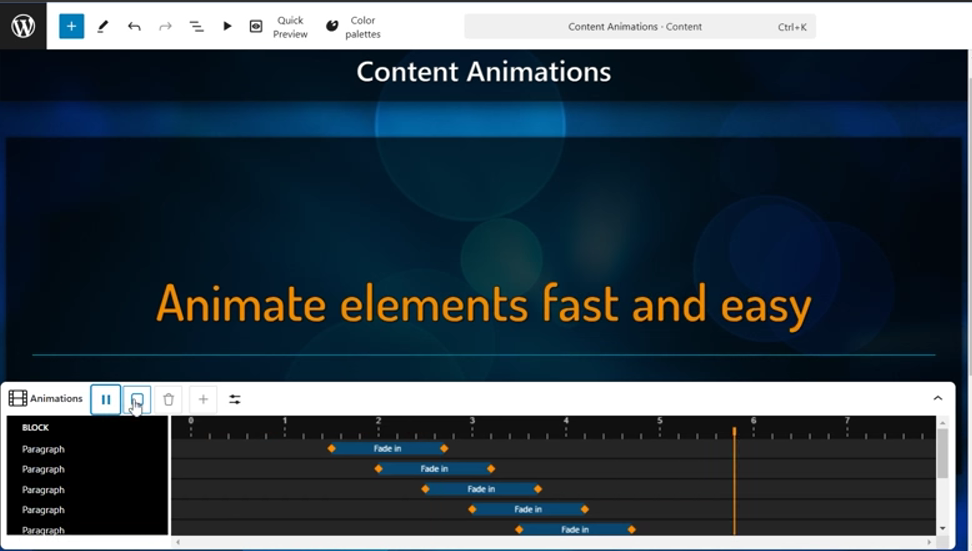
- Added a new animation control in the content editor, which makes it easier to animate the content.
- Click “Animate all elements” to quickly add animations to all elements and adjust each animation individually with easy-to-use visual controls.
- Animations can be dragged, resized and much more.
- New animation control shows all animations in timeline view and allows you to adjust them individually or in bulk.
- Slide loading in the content editor is now much faster.
Content editor and Slide editor
- Gradient support has been added to color palettes.
- The color palette generator lets you easily create new gradients in a color palette from any image. You can also create a completely new gradient yourself.
- The background color of the slides can now also be selected from the color palette.
- Support for gradient palettes has been added to the “Rays” background type.
- This update also automatically adds gradients to the Infotaulu built-in default color palette.
Settings
- The extension management page in Infotaulu settings has been improved with better and more isolated validation and upload processes for extensions. Previously, uploading the same extension multiple times could sometimes result in issues where the older version remained active alongside the new version. Now, uploaded extensions are isolated, ensuring they cannot affect each other or the rest of the system.
Extensions
- Infotaulu frontend extensions now support multiple instances, allowing the same extension to be used multiple times on a single slide with different settings. This enhancement enables users to display, for example, weather information in two different units on the same slide, which was not possible before due to a limitation of only one configuration per slide.
- Extensions can now define a schema for supported and required settings, significantly simplifying configuration for users. With this schema in place, a graphical user interface is automatically generated for each setting, guiding users through the configuration process. For developers, this means reduced coding effort, as there is no longer a need to manually check for valid configuration values; the settings view enforces this, preventing the saving of disallowed settings.
- The Infotaulu content editor now features event simulation tools for extensions. If an extension utilizes slide change or channel change events, these can now be easily triggered directly from the extension’s sidebar, enhancing the testing and configuration process for users.
Updated Extensions
Following extensions have been updated and can now be individually configured in the content editor:
- Infotaulu Weather
- Infotaulu DateTime
Other
- Updated all third-party libraries.
- Fixed translation issues in WP 6.7 and later.
Bug fixes
- Fixed slide autosave functionality in the content editor.
- Fixed the Quick preview feature in the content editor.